
Download USB AutoRunner – USB autorun, auto launch, portable apps, USB utility
Overview
USB AutoRunner is a utility application designed to streamline the process of creating autorun files for programs stored on USB drives. Its primary purpose is to enable automatic execution of selected applications when the USB is inserted into a computer, eliminating the need for manual launching. This functionality is particularly valuable for users who frequently switch between multiple systems and rely on portable software for consistent workflows. The app serves as a lightweight, efficient tool for individuals in fields such as IT support, education, or mobile work environments where rapid access to tools is essential.
By generating autorun files with minimal user input, USB AutoRunner reduces the technical barrier associated with manual configuration of autorun.inf files. This makes it accessible to users with varying levels of technical expertise. The application is especially useful in scenarios where users need to carry a suite of tools—such as diagnostic utilities, presentation software, or data analysis programs—on a single USB drive and want them to launch automatically upon connection.
Developed by Ryan J. Boudreaux, the app has been available since 2008, indicating a long-standing presence in the utility software space. Although the developer did not provide additional technical details about the app’s architecture or updates, its continued relevance suggests a stable and reliable core functionality. USB AutoRunner fits into the broader ecosystem of portable software tools, offering a simple yet effective solution for automation on removable storage devices.
Key Features & Functionality
- Automatic Program Launch: When a USB drive containing a configured autorun file is inserted into a computer, the designated application launches automatically. This feature saves time and ensures consistent access to essential tools across different systems.
- User-Friendly Interface: The application features a straightforward layout with clear navigation, allowing users to configure settings without requiring technical knowledge. This simplicity enhances usability for non-expert users.
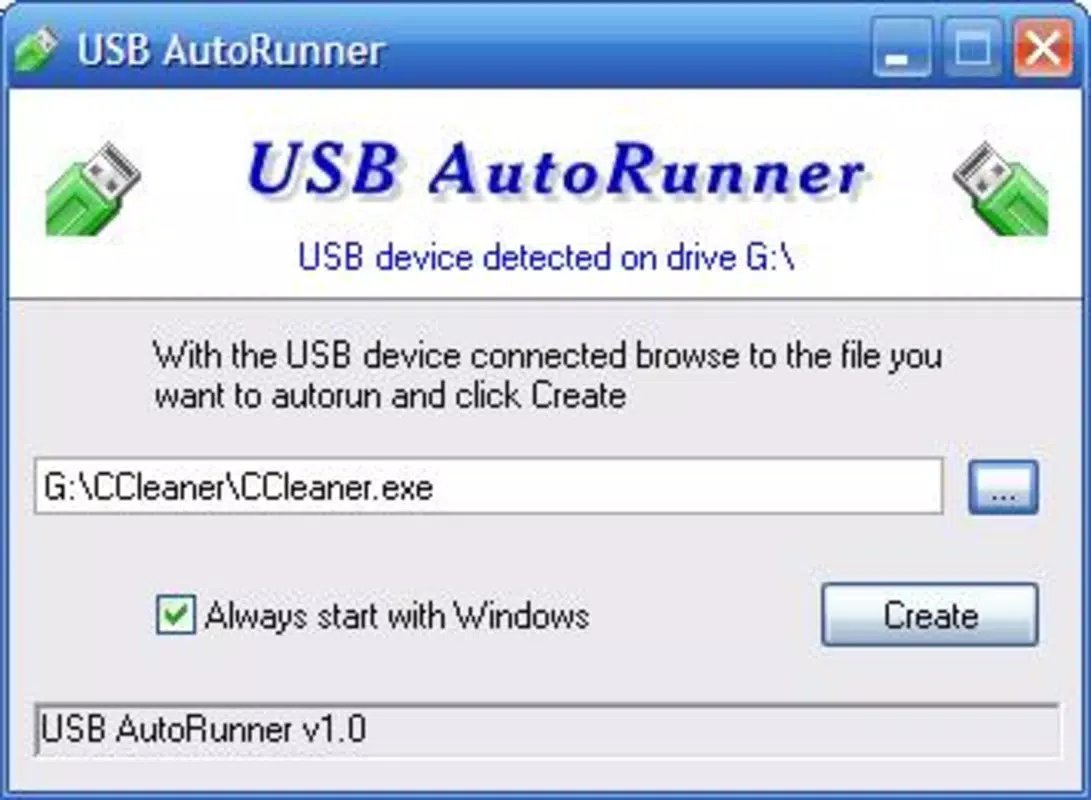
- Easy Autorun File Creation: Users can load the executable file of any desired program, and the app generates the necessary autorun.inf file automatically. This one-click process minimizes configuration effort and reduces the risk of errors.
- Quick Configuration Process: After creating or modifying an autorun file, users only need to safely eject and reinsert the USB drive for changes to take effect. This immediate feedback loop enables rapid iteration and testing.
- Portable Solution: As a portable application, USB AutoRunner can be run directly from a USB drive without installation. This allows users to carry the tool with them and configure autorun functionality on any compatible computer.
For example, a teacher might use USB AutoRunner to launch a presentation tool and a digital portfolio when inserting their USB into a classroom computer. Similarly, a technician could automate the launch of diagnostic software upon connecting a USB to a client’s machine, improving efficiency during on-site visits.
Interface, UX & Performance
USB AutoRunner presents a clean and minimalistic interface, optimized for ease of use. The layout focuses on essential controls, such as file selection and configuration options, with no unnecessary clutter. Navigation is linear and intuitive, guiding users through the autorun setup process with clear prompts.
Although the developer did not list formal performance metrics, the application’s small file size of 1.3 MB suggests a lightweight footprint. This indicates efficient resource usage and fast startup times, which is critical for a utility tool that should not interfere with system performance. The app is designed to operate without background processes, reducing strain on system memory and CPU.
Responsiveness is consistent across different device categories, including older Windows systems. The application does not require elevated permissions for basic operation, which enhances accessibility. Stability appears reliable based on its long-term availability, though the lack of recent updates may raise concerns about compatibility with newer operating systems.
Platform Compatibility & Technical Requirements
USB AutoRunner is designed for the Windows platform and is compatible with Windows operating systems. The application version is 1.0.0, and its file size is 1.3 MB. It is available at no cost, making it accessible to a broad user base.
The developer did not specify minimum OS requirements or compatibility details beyond the platform. As such, users should exercise caution when deploying the app on newer Windows versions, particularly those with enhanced security policies around autorun execution. Compatibility information was not fully disclosed.
Pros and Cons
Pros
- Simple, intuitive interface suitable for non-technical users
- Efficient creation of autorun files with minimal steps
- Portable design allows use without installation
- Free to download and use
- Quick configuration with immediate effect upon USB reinsertion
Cons
- No official updates since 2008, raising potential compatibility concerns
- Compatibility with modern Windows systems not confirmed
- Limited feature set compared to contemporary automation tools
- No support for multiple autorun profiles or advanced scripting
- Developer did not provide detailed technical documentation
FAQ
Is USB AutoRunner safe to use?
Yes, the app is free and designed to generate standard autorun files. However, users should exercise caution when running unknown programs from USB drives, as autorun can be exploited by malware. Always verify the source of the executable file.
Can I use USB AutoRunner on Windows 10 or Windows 11?
While the app is compatible with Windows, the developer did not confirm support for newer versions. Some features may be restricted due to enhanced security policies in modern Windows systems.
Do I need to install USB AutoRunner?
No. The application is portable and can be run directly from a USB drive without installation. This makes it ideal for use on shared or restricted computers.
How do I update USB AutoRunner?
The latest version available is 1.0.0. As no updates have been released since 2008, there is no official update mechanism. Users should rely on the current version unless alternative tools are explored.
Can I create multiple autorun files on one USB drive?
While the app supports creating autorun files for individual programs, it does not appear to support managing multiple profiles or complex launch sequences. Each file is configured independently.
Final Thoughts
USB AutoRunner remains a niche but functional tool for users seeking to automate program launches from USB drives. Its simplicity, portability, and zero cost make it a compelling choice for those who value straightforward utility software. While its age and lack of updates may limit its effectiveness on modern systems, it continues to serve its core purpose reliably for basic autorun needs.
Individuals who frequently use portable applications—such as educators, technicians, or remote workers—can benefit most from this tool. Its ability to streamline access to essential software without additional steps adds tangible value to mobile workflows.
Despite its limitations, USB AutoRunner demonstrates the enduring utility of well-designed, focused tools. For users seeking a no-frills solution to automate USB launches, it remains a viable option.
Download USB AutoRunner now


